How to create an org chart (step by step)
Add your CEO, build the structure downward, drag to rearrange, export PNG. Free org chart maker in your browser — no signup required.
An org chart answers one question: who reports to whom. You do not need Visio or SmartArt — you need a list of people and their managers.
New here? Read what is an organizational chart. Already have names in Excel? Use the CSV template. Want inspiration first? See org chart examples.
This walkthrough uses the free org chart maker — open it in a new tab and follow along.
1. Start with the top person
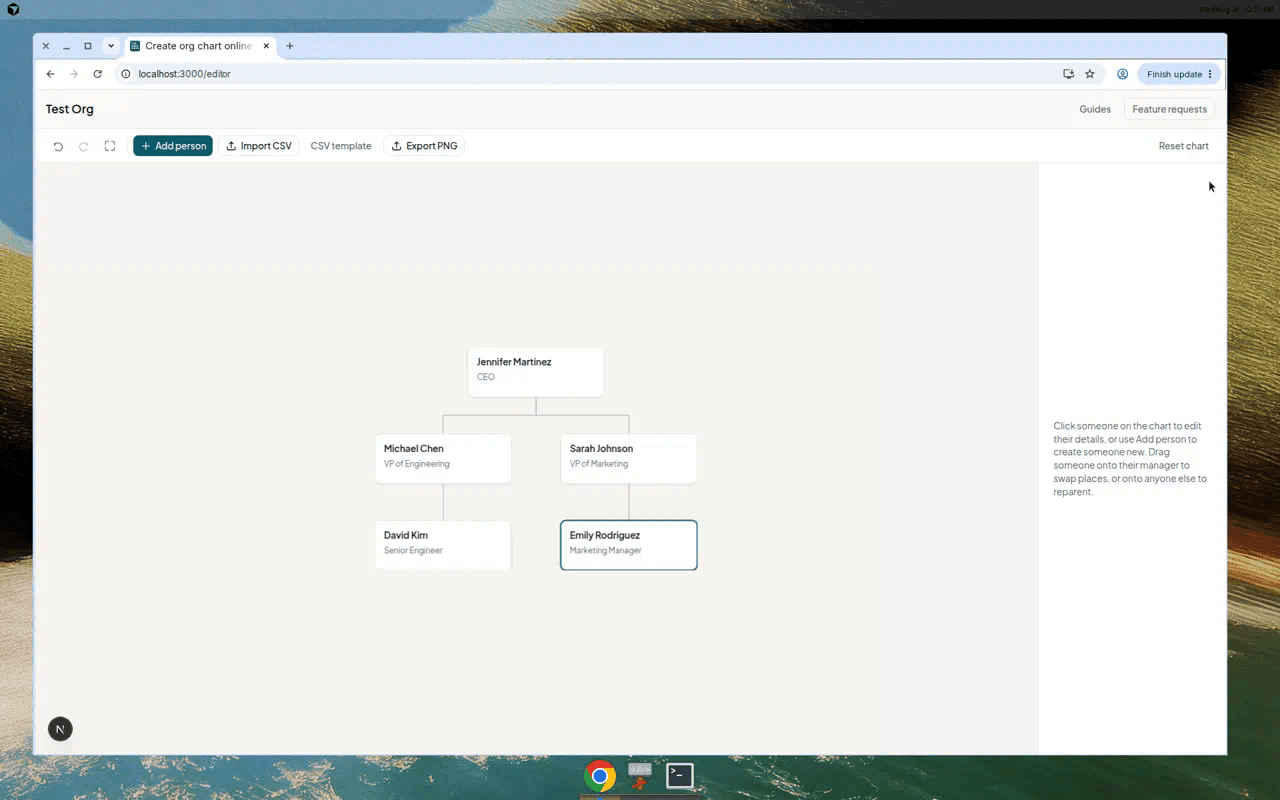
Open the editor and click Add CEO — or Add person if you prefer a different label. Give them a name and job title. Department and email are optional.
Everything else hangs off this person, so pick whoever sits at the top of the structure you are drawing.

2. Add people downward
Use Add person in the toolbar. Choose who they report to in the Reports to dropdown — usually the person you selected on the chart, or the CEO for their direct reports.
Repeat until your structure is complete. Click someone on the chart any time to edit their details.

3. Rearrange by dragging
When reporting lines change, drag a person onto their new manager to reparent them. Drag someone onto their direct report to swap places — useful when two people switch roles.
Undo is in the toolbar if you slip. The chart saves in your browser as you work.
4. Share it
When the chart is ready, export it as PNG for slides or docs. Comparing tools? Read best free org chart software.
Start a chart
Add your top person and build downward — takes a few minutes, free in your browser.
Create an org chart